Optimal AI Systems / Field DeskThe platform behind the work.

Technical jobs. Organized and documented.

Field Desk.

Clarity on site.
A record to hand over.

We developed Optimal Field Desk to organize installation jobs—from drawings and equipment schedules to site observations and handoff preparation. It brings the plan, the recorded work and the items still to review into one connected workflow.

Our internal job-documentation platform · Public example below

THE CONNECTED JOB RECORDField Desk / Example
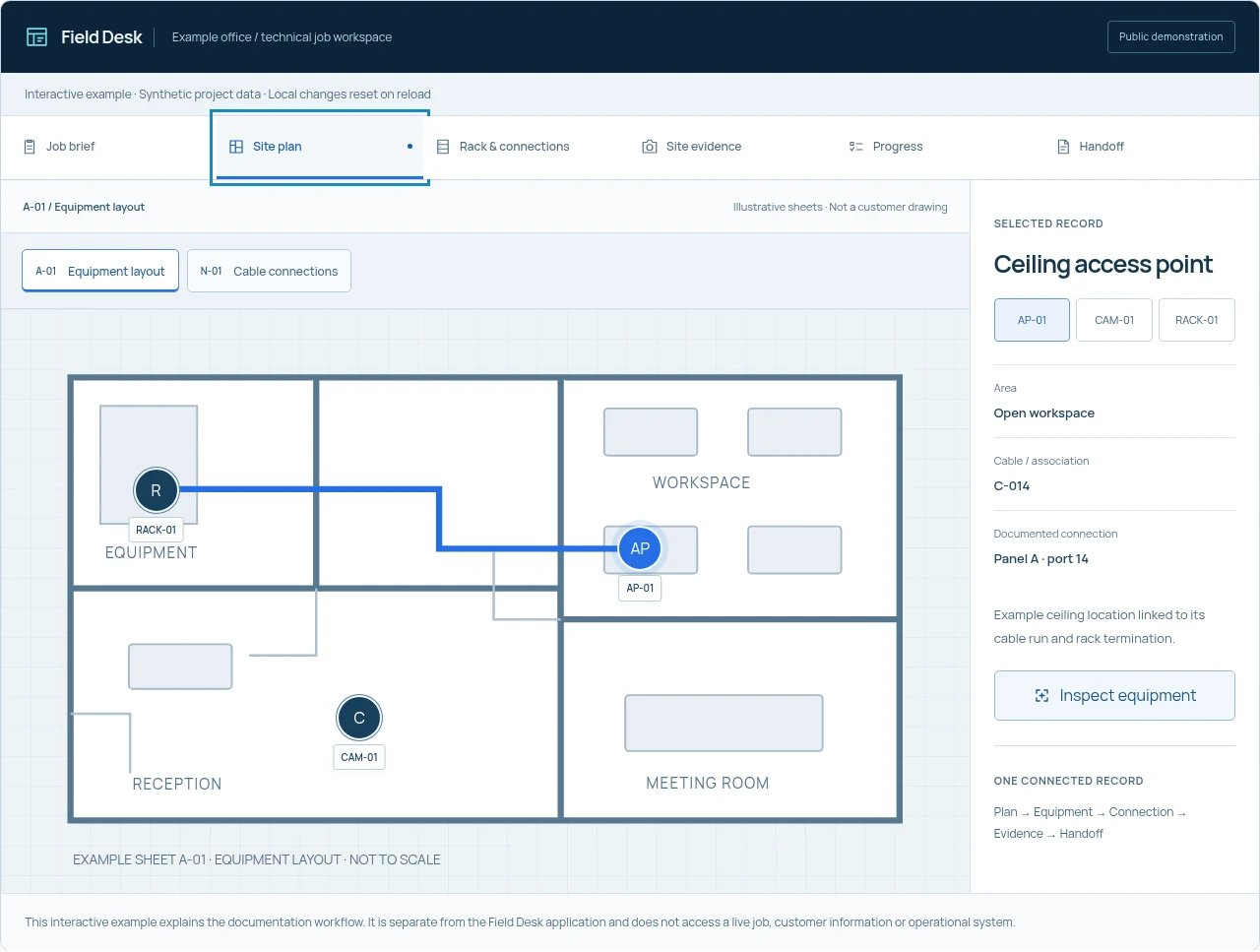
Synthetic Field Desk example workspace for an office installation job
One job. The useful details together.Scope, plans, connections, evidence and review.

A working example, with fictional project data

Follow a job.
Keep the context.

Read the brief, open a plan and follow a connection. Add an example note, review evidence and record checklist items to see how they come together in a draft handoff.

Field DeskExample office / technical job workspace
Public demonstration

Interactive example · Synthetic project data · Local changes reset on reload

Example job / Documentation brief

Office network installation.

A fictional assignment connecting the agreed scope, plan, equipment and record of the work.

Work areaExample office
Planning referencesA-01 · N-01
Review stateDemonstration draft

Scope for this example

  • Locate an access point, entry camera and network enclosure.
  • Associate the example equipment with its labeled cable and rack connection.
  • Keep preparation notes and observations available for handoff review.

This example does not include live testing, installation certification or a real completion date.

Site instructions & notes

Stored in this example only
  • Example instruction: confirm the final device locations against the plan before recording placement.

Keep customer information out of this public example. Changes reset on reload.

1 note in this example · 0/280 characters

The example job

One workspace.
A connected record.

Demonstration draft
Equipment references
AP-01 · CAM-01 · RACK-01
Plan sheets
A-01 layout · N-01 connections
Checklist review
0 of 6 recorded
Evidence review
0 of 3 reviewed

The example follows a job from preparation through its documented equipment and draft handoff.

Try the workflow

Read the brief, open a plan, inspect a connection, review an observation and record a checklist item.

This interactive example explains the documentation workflow. It is separate from the Field Desk application and does not access a live job, customer information or operational system.

Professional job documentation

We document the work
with its context.

A drawing, a label and a site photograph each tell part of the story. Keeping them associated with the agreed job makes the work easier to review, explain and maintain.

01

Jobs, instructions & preparation

Prepare around the actual scope.

Bring the requested work, site instructions, preparation notes, required tools and deliverables together before the work begins. Keep exclusions and items needing clarification with the same job.

Job brief · Work-order references · Preparation notes
02

Blueprints, site plans & equipment

Put the plan in context.

Field Desk supports supplied PDF and image plans with equipment locations, cable routes and plan references. The drawing helps explain where the documented equipment belongs.

Plan sheets · Device locations · Intended routes
03

Racks, cables & ports

Follow the recorded connection.

Keep rack positions, front and rear views, cable labels and connection records together. A documented path can be followed from a device to its run and rack termination.

Rack elevations · Equipment schedules · Connection trace
04

Photos, observations & closeout

Review the work with its evidence.

Associate photographs and observations with the place, device or cable run they describe. Keep recorded checks, outstanding questions and handoff preparation visible in the job workflow.

Contextual evidence · Review requirements · Handoff versions

A connection you can follow

The same equipment reference belongs to the plan, cable schedule and rack record.

  1. PlanA-01
  2. DeviceAP-01
  3. CableC-014
  4. RackPanel A / 14

Synthetic example. A documented connection is not a cable-test result or certification.

From preparation to customer handoff

A useful record
across the whole job.

Field Desk connects job-site documentation with the broader job workflow. The purpose is practical: know what was requested, what was recorded and what still needs attention.

Explore our installation services
  1. On site

    Keep the reference close to the work.

    Plans, equipment details, instructions and observations stay organized around the job. The interface is designed for laptop, tablet and phone workflows.

  2. Review

    Make outstanding items visible.

    Recorded checks, evidence requirements and review notes help explain what remains. Technical results need their actual method, instrument and outcome.

  3. Handoff

    Prepare a record someone can understand.

    Bring the agreed scope, equipment and connection schedule, observations and open items into a reviewable handoff version.

Documentation depth, testing, deliverable formats and customer access are defined by the agreed scope. Field Desk is our internal platform; this public example is not a customer portal or a promise that every installation includes every record shown.

Professional field-service assignments

Working with us through Field Nation?

Discuss the assignment scope, site access, required documentation and completion expectations with Danny.

Find us on Field Nation

Field Desk × OPROV / Future research

From an observation
to a useful record.

A supervised robotics assistant could eventually contribute an inspection image, location reference or structured observation. We’re exploring how a technician could review that material before it becomes part of a job record.

This is a proposed integration. The public demonstrations do not connect to a robot or an operational Field Desk account.

Explore the proposed integration
Proposed evidence pathway
01

Observe

A concept robot captures an observation

02

Review

A technician checks context and accuracy

03

Associate

Approved evidence connects to the job

04

Document

The reviewed record informs the handoff

Research goal · Human review required

A few useful distinctions

What to expect.

Is this the live Field Desk application?

No. This is a public example using fictional project data. Its notes, checklist selections and evidence reviews stay in the current page and reset when it reloads. The separate Field Desk application is not connected here, and no customer records or private project files are loaded.

What documentation will my project include?

The useful records depend on the work. Plan references, equipment schedules, connection details, photographs, technical tests and handoff formats are discussed and agreed for the individual project. The public example illustrates the workflow without establishing a standard deliverable for every installation.

Does a recorded connection mean a cable has passed testing?

No. A documented route or port association explains the record. An actual technical test needs the appropriate instrument, method, result and outcome. Recording a checklist item is not a certification.

Can Field Desk receive live robotics observations?

That is a proposed future integration. OPROV is an early-stage robotics initiative, and its website demonstrations are scripted concepts. A real integration would require permission, secure data handling and technician review.

Start with the work

A clear scope.
A better-organized job.

Tell us about the installation, the working environment and the records that would make the project easier to understand.

Request an installation quote danny@optimalai.systems

Optimal AI Systems
Operated by Optimal Enterprises LLC
Northeast Ohio